Running a business is already hard managing payroll, employee shifts, and compliance shouldn’t make it harder. 💼
But here’s where most people get confused:
👉 Gusto and Homebase are not the same type of tool and choosing the wrong one can cost you time, money, and productivity.
So before you pick any software, ask yourself:
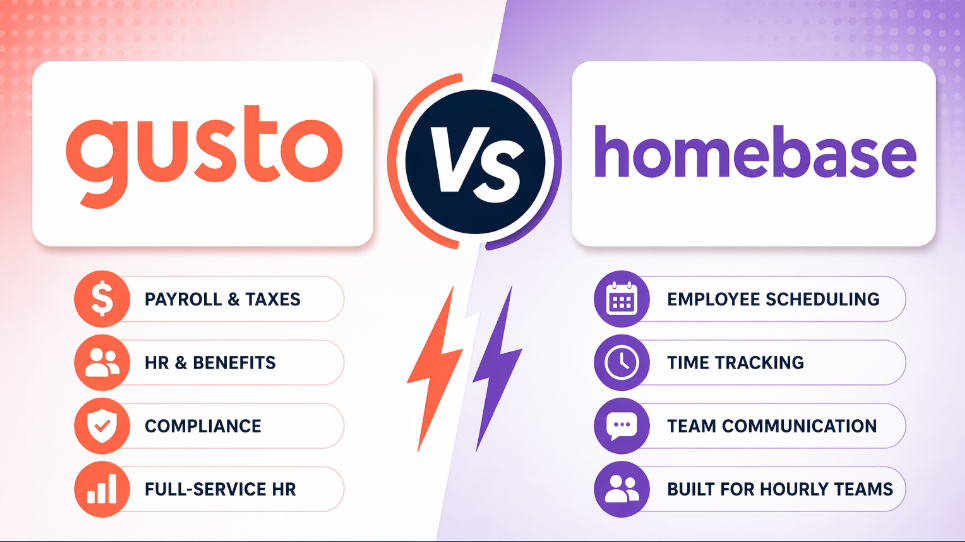
👉 Do you need full payroll & HR automation, or just employee scheduling and time tracking?
In this guide, we’ll break down Gusto vs Homebase in a simple way so you can clearly understand what each tool does, where it fits, and which one is actually right for your business. ⚡
🤔 Gusto vs Homebase: Quick Comparison (TL;DR)
| Feature | 💚 Gusto | 🧡 Homebase |
|---|---|---|
| Starting Price | $49/mo + $6/person | Free plan available |
| Payroll Add-On | Included in base plans | $39/mo + $6/person |
| Best For | Salaried & mixed workforces | Hourly, shift-based teams |
| Scheduling | Available on Plus+ plans | Native drag-and-drop |
| Time Tracking | Available on Plus+ plans | Built-in, GPS-enabled |
| Employee App | Gusto Wallet | Homebase mobile app |
| Free Trial | Yes | Yes (no credit card) |
🧾 What Is Gusto? (Overview + Best Use Cases)
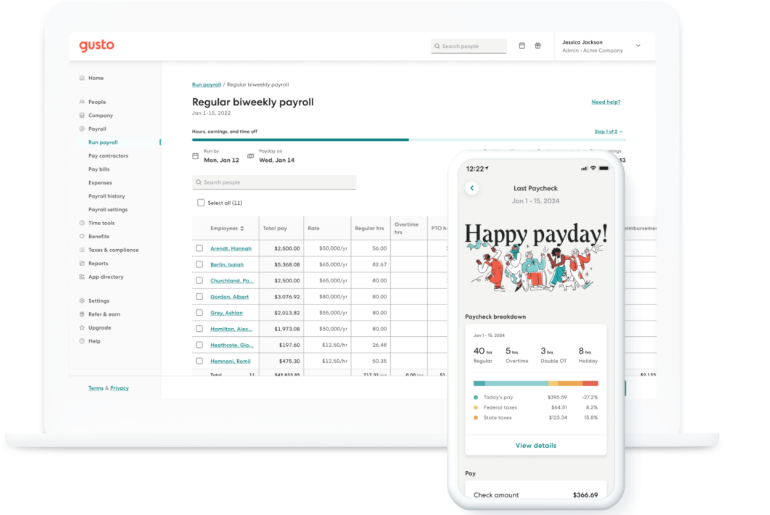
Gusto is a cloud-based platform that combines full-service payroll with HR tools, benefits administration, and compliance management. Founded in 2011 (originally as ZenPayroll), Gusto has grown to serve over 300,000 businesses across the US.
Key features include:
- Unlimited payroll runs per month with automatic tax filing (federal, state, and local)
- Health insurance, 401(k), workers’ comp, and commuter benefits
- Employee onboarding, document storage, and PTO management
- Time tracking and scheduling (available on Plus plan)
- Contractor payments (W-9 collection, 1099 filing)
- Global contractor payments in 120+ countries
Best use cases for Gusto:
- 👤 Solopreneurs using the Contractor Only plan
- 👨💼 Startups and small businesses (1–100 employees) with salaried employees
- 🏢 Professional service firms (agencies, consultants, law firms)
- 💼 Mixed workforces (both W-2 employees and 1099 contractors)
- 🚀 Businesses planning to scale and add benefits like 401(k)
📅 What Is Homebase? (Overview + Best Use Cases)
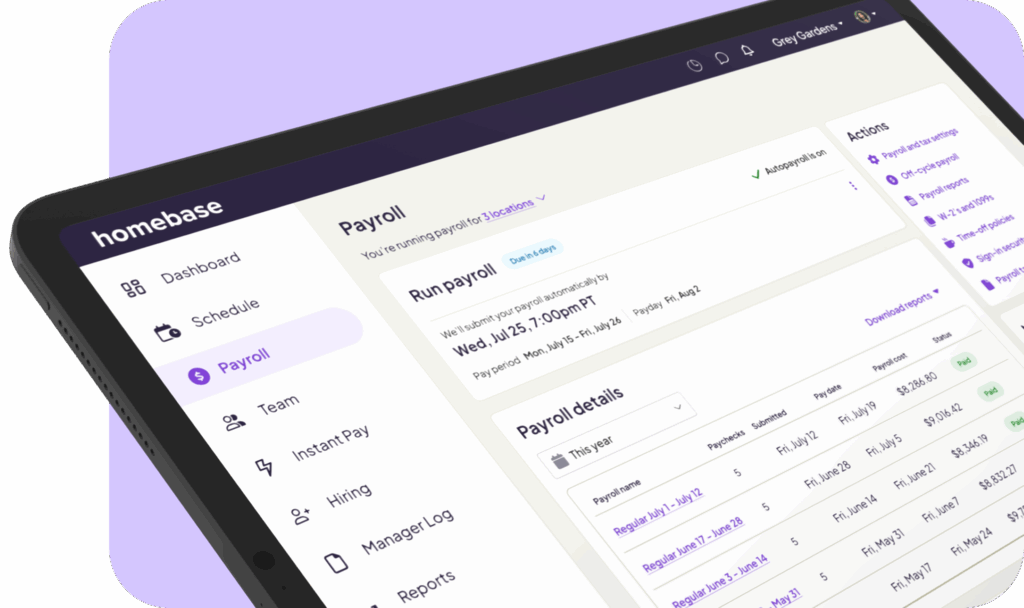
Homebase is the everything app for hourly teams, combining employee scheduling, time tracking, payroll, and HR in one platform. Founded in 2014, Homebase is trusted by over 100,000 small businesses, particularly in restaurants, retail, hospitality, and healthcare.
Key features include:
- Drag-and-drop scheduling with templates, availability tracking, and conflict alerts
- Mobile time clock with GPS and geofencing
- Team communication and shift trading
- Hiring and onboarding tools (job posting, applicant tracking)
- Payroll add-on that syncs hours directly to payroll
- Labor law compliance alerts
Best use cases for Homebase:
💰 Pricing Comparison: Gusto vs Homebase (Plans, Costs & Value)
Gusto Pricing Plans (2026)
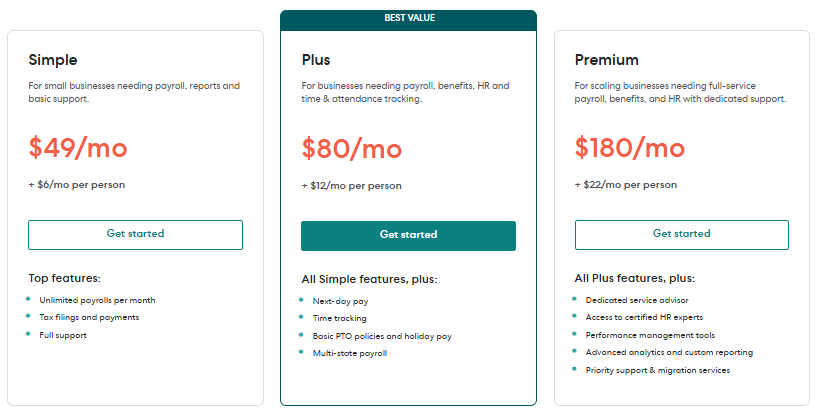
Gusto offers straightforward, transparent pricing with no hidden fees. All plans include full-service payroll, unlimited payroll runs, and automatic tax filing.
| Plan | Monthly Base Fee | Per-Person Fee | Key Features |
|---|---|---|---|
| Simple | $49 | $6 | Full-service payroll, auto tax filings (W-2 and 1099), expert support, 2–4 day direct deposit, employee self-onboarding |
| Plus | $89 | $14 | Next-day direct deposit, multi-state payroll, time tracking, PTO management, project tracking, employee surveys |
| Premium | $180+ | $22 | Dedicated service advisor, priority support, HR resource center, compliance alerts, advanced reporting |
Add-on costs:
- Contractor Only plan: $35/month + $6/contractor (only in months you pay them)
- Global contractor payments: available (pricing varies)
- Priority Support: faster phone and chat response times
Homebase Pricing Plans (2026)
Homebase offers four tiers, including a generous free plan. Payroll is a separate add-on.
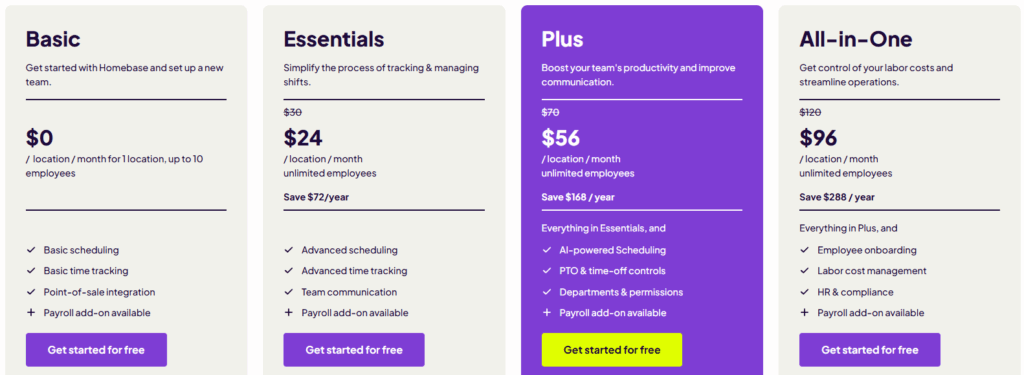
| Plan | Price (per location/month) | Best For |
|---|---|---|
| Basic | Free (1 location, up to 10 employees) | Basic scheduling, basic time tracking, POS integration, free forever |
| Essentials | $24.95 ($20 annual) | Advanced scheduling, advanced time tracking, team communication, multi-state payroll (add-on) |
| Plus | $60 | AI-powered scheduling, PTO controls, departments & permissions, labor cost forecasting |
| All-in-One | $120 | Everything in Plus, plus employee onboarding, labor cost management, HR & compliance |
Payroll add-on: $39/month + $6/month per active employee
Value Verdict
- For businesses wanting benefits administration → Gusto is the only choice (Homebase doesn’t offer health insurance or 401(k)).
- For small businesses on a budget → Homebase Basic (free) is an unbeatable entry point.
- For mixed workforces needing full-service payroll → Gusto Simple ($49 + $6/person) offers more value than Homebase’s paid plans + payroll add-on.
- For restaurants and retailers → Homebase Plus ($60/location/month) provides scheduling and time tracking features that Gusto doesn’t match.
🧑💻 Ease of Use & Setup (Which Is More Beginner-Friendly?)
Gusto is widely praised for its intuitive, modern interface. New users can typically complete onboarding and run their first payroll in under 30 minutes. The dashboard is clean and well-organized, with clear navigation for payroll, team management, and benefits.
Homebase also scores high on usability, especially for scheduling. The drag-and-drop schedule builder is intuitive, and the mobile app is well-designed. Users report that setup is simple, though the “quick start” schedule upload feature can be hit-or-miss.
Winner: Gusto for overall ease of use; Homebase for scheduling-specific tasks.
📈 Features Comparison: Gusto vs Homebase (Payroll, HR, Scheduling)
| Feature | Gusto | Homebase |
|---|---|---|
| Payroll Processing | ✅ Unlimited runs, 8 min average | ✅ Add-on only |
| Auto Tax Filing | ✅ Federal, state, local | ✅ With payroll add-on |
| Multi-State Payroll | ✅ (Plus & Premium) | ✅ (with payroll add-on) |
| Benefits Administration | ✅ Health, 401(k), commuter | ❌ |
| Employee Onboarding | ✅ Digital offer letters, e-signatures | ✅ (All-in-One plan) |
| Time Tracking | ✅ (Plus plan) | ✅ Built-in |
| Employee Scheduling | ✅ (Plus plan) | ✅ Drag-and-drop, templates |
| Team Communication | ✅ Basic | ✅ Messaging, shift trading |
| HR & Compliance | ✅ (Premium) | ✅ (All-in-One plan) |
| Reporting | ✅ Standard | Limited (scored 2/5) |
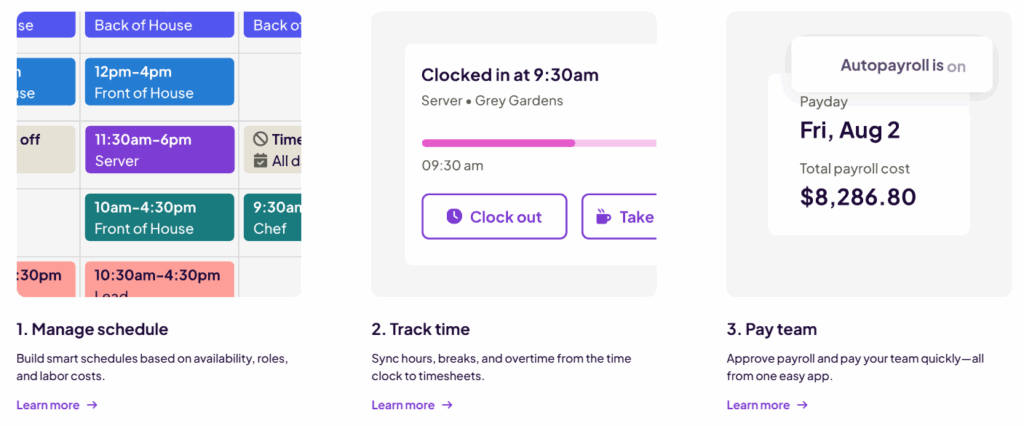
🧾 Payroll Processing & Automation (Which One Saves More Time?)
Gusto is a payroll-first platform. Customers report completing payroll in an average of 8 minutes, with the option to set up AutoPilot for fully automatic runs. Gusto automatically calculates, files, and pays federal, state, and local taxes every time you run payroll, including W-2s and 1099s at no extra cost.
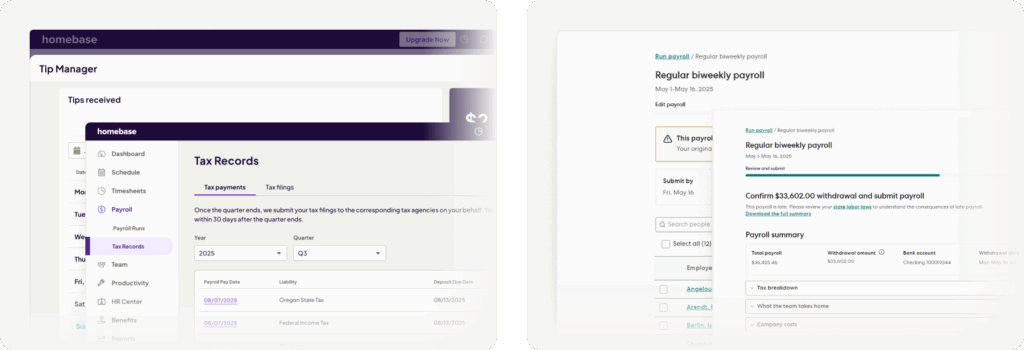
Homebase takes a different approach. Payroll is an add-on, not included in any base plan. However, the integration is seamless: employee hours from Homebase sync directly to Gusto (or other providers like ADP, QuickBooks) for payroll processing. This eliminates manual data entry and reduces errors.
Winner: Gusto for businesses prioritizing payroll; Homebase+Gusto integration for businesses that want the best of both worlds.
📅 Employee Scheduling & Time Tracking (Where Homebase Shines)
This is Homebase’s core strength. The platform offers:
- Drag-and-drop schedule builder with templates and conflict alerts
- Mobile time clock with GPS and geofencing to verify employee locations
- Shift trading and availability tracking – employees can request swaps with minimal manager intervention
- Overtime alerts to help control labor costs
- POS integration (Square, Toast, Clover) for seamless clock-in from the register
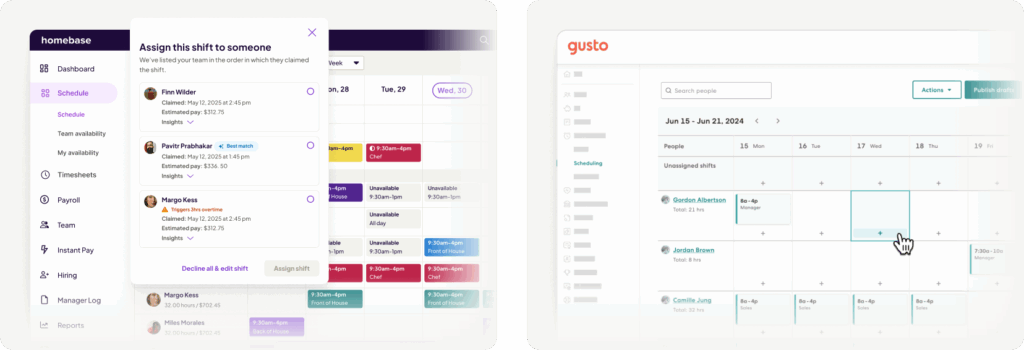
Gusto includes scheduling and time tracking only on its higher-tier plans, and even then, the functionality is less robust than Homebase’s dedicated tools.
Winner: Homebase (unquestionably superior for hourly teams).
👥 HR & Compliance Tools Comparison
Gusto offers a robust suite of HR tools across all plans: employee self-onboarding, document storage, PTO management, and organizational charting. Premium plan adds a dedicated HR resource center, certified HR experts, and compliance alerts.
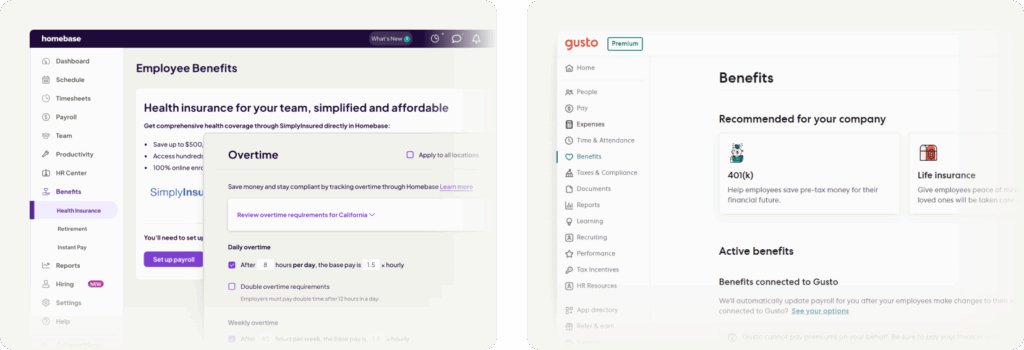
Homebase includes HR and compliance features only on its All-in-One plan ($120/location/month), including employee onboarding, labor cost management, and compliance alerts. Users have noted that pay and wage management lacks flexibility and sometimes requires upgrades to access basic features.
Winner: Gusto (more comprehensive HR tools across lower-tier plans).
📊 Reporting & Analytics
Gusto provides standard reports for payroll history, employee details, tax filings, and time-off balances. While functional, some users find reporting less customizable than competitors.
Homebase has a notable weakness here. In detailed reviews, Homebase’s reporting features scored only 2 out of 5, with users citing weaker reporting around time and attendance.
Winner: Gusto (better overall reporting).
🔗 Integrations & Ecosystem
Gusto integrates with 300+ business apps, including accounting software (QuickBooks, Xero), POS systems, and time-tracking tools. Notably, Gusto offers a native integration with Homebase that syncs employees and timesheets between the two platforms.

Homebase integrates with 200+ apps, including Square, QuickBooks, Xero, ADP, and Gusto. However, users have rated Homebase’s integrations lower (2/5) compared to alternatives.
The Gusto + Homebase Integration
For businesses that want the best of both worlds, the Gusto-Homebase integration is seamless:
- Employees and new hires sync from Gusto to Homebase
- Timesheets sync from Homebase to Gusto (including regular hours, overtime, PTO, and wage rates)
- Manual data entry is eliminated, reducing errors and saving time
Limitation: If you have multiple Homebase locations but only one Gusto account, hours won’t sync correctly. You’ll need to manually add hours for employees working at different locations.
Winner: Tie – both have strong integration ecosystems, and they work beautifully together.
📱 Mobile App & Accessibility
Gusto offers a highly-rated mobile app (4.6/5 on Capterra) that allows employees to view paystubs, request time off, clock in/out, and access their Gusto Wallet for early wage access.
Homebase also has a strong mobile presence. Managers can build schedules, track hours, and communicate with teams from their phones. Employees can clock in/out, view schedules, request time off, and trade shifts directly from the app.
Winner: Tie – both offer excellent mobile experiences for their respective use cases.
🔐 Security & Data Protection
Gusto maintains SOC 2 Type 2, ISO 27001, and PCI DSS certifications. Customer data is encrypted, and multi-factor authentication is required for logins.
Homebase also follows industry-standard security practices, with data encryption in transit and at rest. Employee time cards are securely stored in the cloud with edit history tracking.
Winner: Tie (both maintain enterprise-grade security).
🤝 Customer Support & Service Quality
Customer support is where both platforms receive mixed reviews.
Gusto has a 4.6/5 average rating on Capterra across over 4,100 reviews. However, some users report long wait times and inconsistent support quality. One reviewer noted: “Unreliable with payroll deposits and the customer service is terrible”. Others praise the support team as “super supportive and helpful”.
Homebase scores 4.5/5 for customer service on Capterra, with users noting responsive support via chat. However, some users report software glitches and issues with payroll features.
Winner: Homebase (slightly better real-time support options).
🔄 Free Trial, Refund Policy & Hidden Costs
Gusto:
- ✅ No free trial (but month-to-month, cancel anytime)
- ✅ Fully transparent pricing with no hidden fees
- ✅ Cancel anytime
- ⚠️ Higher per-person costs on Plus plan
Homebase:
- ✅ Free Basic plan forever
- ✅ Free trial of paid plans (no credit card required)
- ✅ Cancel anytime
- ⚠️ Payroll is an add-on ($39 + $6/person)
- ⚠️ Some features (like task management) require additional $13/location/month
Winner: Homebase (free plan is a major advantage for bootstrapped businesses).
👤 Who Should Use Gusto vs Homebase? (Best For…)
Who Should Use Gusto?
- 👨💼 Startups and small businesses with salaried employees
- 🏢 Professional service firms (agencies, consultants, law firms)
- 💼 Mixed workforces (W-2 employees + 1099 contractors)
- 🚀 Businesses wanting health insurance and 401(k) benefits
- 🌍 Companies paying international contractors
- 📈 Businesses planning to scale beyond 50 employees
Who Should Use Homebase?
- 🍔 Restaurants, cafes, and food & beverage businesses
- 🛍️ Retail stores and boutiques
- 🏥 Healthcare facilities with shift-based staff
- ⏰ Businesses with hourly, shift-based employees
- 💰 Bootstrapped startups wanting a free plan to start
- 📱 Mobile-first managers who build schedules on the go

⚖️ Pros and Cons: Gusto vs Homebase
Gusto Pros and Cons
Homebase Pros and Cons
🏁 Final Verdict: Gusto vs Homebase – Which One Wins?
There is no single winner. The right choice depends entirely on your business type:
Choose Gusto if you:
- Have salaried employees or a mixed workforce
- Need health insurance and 401(k) benefits
- Want full-service payroll with automatic tax filing
- Pay contractors (domestic or international)
- Value all-in-one HR and payroll over specialized scheduling
Choose Homebase if you:
- Run a restaurant, retail store, or other shift-based business
- Have hourly employees who need scheduling and time tracking
- Want a free plan to start
- Need GPS-enabled clock-ins and shift trading
- Already use a separate payroll provider (or plan to use Gusto alongside Homebase)
The smart strategy: Use both! Homebase for scheduling and time tracking, Gusto for payroll and benefits. Their native integration syncs hours seamlessly, giving you the best of both worlds.

Related Article :-
- Gusto vs Deel Breakdown: Best HR Software for Startups
- Gusto vs ADP: Which One Offers Better Features & Pricing?
❓ FAQs
1. Does Gusto have a free plan?
Yes. 3 month free or Gusto’s Simple plan starts at $49/month + $6/person. Homebase offers a free Basic plan.
2. Can Homebase run payroll?
Yes, but as an add-on ($39/month + $6/person). Payroll is not included in any base plan.
3. Does Gusto integrate with Homebase?
Yes. The integration syncs employees from Gusto to Homebase and timesheets from Homebase to Gusto
4. Which is better for restaurants?
Homebase. It’s built specifically for hourly, shift-based teams with drag-and-drop scheduling, shift trading, and POS integration.
5. Does Gusto offer health insurance?
Yes. Gusto helps businesses offer medical, dental, and vision plans, plus 401(k), workers’ comp, and commuter benefits

👨💻 Hi, I’m Anas Khan, a digital marketing expert with over 5 years of experience in e-commerce and affiliate marketing. I specialize in finding the best coupon codes 💸, Black Friday promotions 🛍️, and discount offers 💥 to help you save big!
I’ve dedicated myself to staying on top of the latest trends 📈 in online deals, so I can offer you the most reliable, tested advice. Whether you’re looking for promo codes or exclusive Black Friday deals, you can trust that my recommendations are based on solid research and personal expertise 🏆.